Rectify & scale photos with the Credit Card Photography Scale
This free, browser-based tool corrects perspective and sets a true millimetre scale on
photographs taken with the
Credit Card Photography Scale (Past Horizons). Drop in a photo and the tool automatically
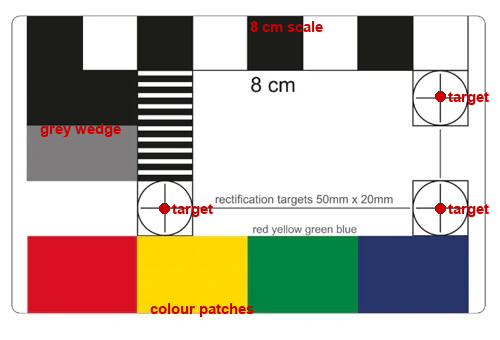
finds the card — its three crosshair rectification targets (50 mm × 20 mm),
the red/yellow/green/blue colour patches and the 8 cm scale bar —
then computes a perspective transform that flattens the image to a known pixels-per-millimetre scale.
Everything runs locally in your browser; your images are never uploaded to a server.
How to use it (quick guide)
- Photograph your object with the card laid flat beside it, both fully in frame, as square-on as you can (avoid steep angles and keep the card off the frame edges).
- Open the tool and drop your photo onto the left panel (or click it to choose a file).
- Auto-detect runs automatically — it finds the card and places the three handles on the crosshair targets. If a handle is slightly off, drag it onto the crosshair centre (a zoom loupe appears while you drag).
- Click “Rectify”. The flattened, to-scale image appears on the right, next to the original.
- Optionally tick “show mm grid” to verify the scale against the 8 cm bar, or “fix colours” to white-balance off the card.
- Download the rectified PNG. The reported scale (pixels per mm) lets you measure anything in the image: pixels ÷ px-per-mm = millimetres.
About the Credit Card Photography Scale
The Credit Card Photography Scale is a credit-card-sized (85.6 × 54 mm) photographic reference and
colour calibration card, widely used in archaeology, heritage, museum and forensic photography.
It carries an 8 cm length scale, a grayscale step wedge, black-and-white resolution patterns,
four saturated colour patches (red, yellow, green, blue), and three crosshair “rectification targets”
arranged on a precise 50 mm × 20 mm grid. Place it flat next to the object you want to measure,
photograph both together, and this tool turns the photo into a flat, to-scale image.
Get the card from Past Horizons:
Credit Card Photography Scale — product page.
What you can do with it
- Remove perspective / keystone from angled photos of flat objects.
- Measure real sizes — every pixel in the result maps to a known number of millimetres.
- Straighten and white-balance document, specimen, forensic, archaeology or lab photos.
- Compare the original and rectified image side by side, then download the corrected PNG.
How it works
The card’s crosshair targets and colour-patch centres are detected automatically and used as ground-control
points for a projective (homography) transform — the same principle as photogrammetric image rectification —
so the output is geometrically corrected and scaled. Built with OpenCV.js (WebAssembly); 100% client-side.
Prefer R? (scripting / batch)
The same rectification is available as an open-source R package,
scalecard,
for processing images from a script or in batch.
Keywords: credit card photography scale, calibration card rectifier, image rectification online, perspective correction,
photo straightening, crosshair rectification targets, 50 mm × 20 mm targets, 8 cm photo scale bar,
colour calibration card, measure objects in a photo, pixels per millimetre, scale a photo to mm,
archaeology / forensic / scientific photography scale.
Disclaimer: this is an independent, free tool and is not affiliated with,
endorsed by, or sponsored by Past Horizons. “Credit Card Photography Scale” and any related names are the property
of their respective owners; links to the product page are provided for convenience only.
Image processing powered by
OpenCV (OpenCV.js, Apache License 2.0),
running entirely in your browser via WebAssembly.
Privacy: your photos are processed only on your device and are never uploaded.
We keep an anonymous count of rectifications and the visitor's country (country level only) to show where the tool is used —
no images, no IP addresses, no precise location, and no personal data are stored.